


MyFxHelper - Forex Signal
4.274.00 Reviews
App Specs
- Version
- 19.0.1
- Updated On
- License
- Free
- Downloads
- 100,000+
- Developer
- MHFCORP
- Categories
- Finance
- Platform
- Android
Screenshots
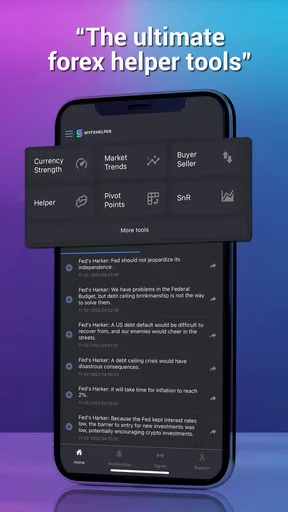
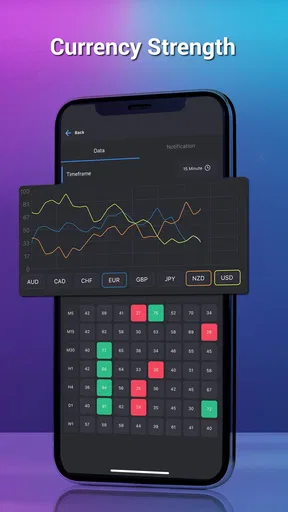
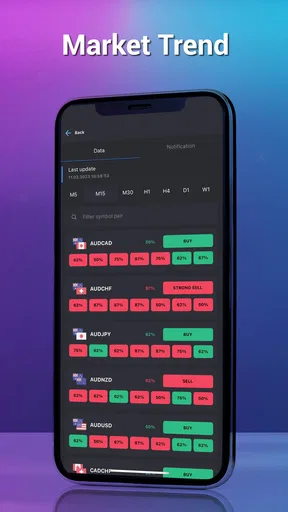
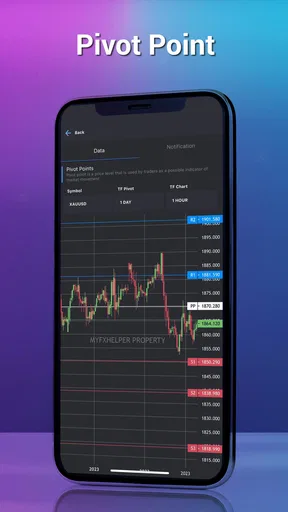
 Analysis by AppCompare
MyFxHelper - Forex Signal is the kind of finance app I would approach with a notebook open and my expectations under control. It is designed for people who want help while following the foreign-exchange market, but a signal tool should never be treated as an automatic route to profit. In my experience, the useful question is not whether an app can make trading effortless; it is whether it helps me make a decision without hiding the risks behind a polished screen.
That distinction matters here. MyFxHelper is a free finance app from MHFCORP, rated for Everyone, and it has built a noticeable audience with more than one hundred thousand installs. Its average rating sits at 4.2 from roughly three thousand ratings, which suggests that many users find a practical purpose in it while leaving enough room for a careful look at its limitations. I see it best as a companion for checking ideas, not as a substitute for a regulated broker, a trading plan, or personal research.
How MyFxHelper fits into a careful forex routine
I use a simple routine to keep a forex signal in its proper place: note the idea, check it against my own rules, and leave execution to a platform that shows the account and risk details. That separation makes it easier to review decisions calmly rather than react to an alert. From there, the next useful step is to look at which personal settings and habits can make that routine more consistent.
A signal tool, not a complete trading environment
The main appeal is straightforward: MyFxHelper aims to make forex trading easier by bringing helper-style information into a mobile setting. That can be useful when I want a quick reference before opening my broker’s platform. Instead of beginning with a blank chart, I can use a signal-oriented app as one input in a broader process: check the market context, compare the idea with my own rules, and only then decide whether further research is worthwhile.
That workflow is more realistic than expecting the app to do the thinking. A forex signal can point attention toward a currency pair or a possible direction, but it cannot remove uncertainty. News, spreads, execution speed, leverage, and the broker’s conditions still affect the result. I would therefore keep the actual order process in a broker app that clearly shows account funds, margin, position size, and execution details. MyFxHelper is more convincing as a preliminary screen than as the place where I would trust every part of a trade.
This also explains why the app may suit different users in different ways. Someone learning how to organize market observations could appreciate a focused helper. A more experienced trader might use it as a second opinion when time is limited. On the other hand, anyone looking for a full charting suite, deep economic research, or direct account management may be happier with a dedicated trading platform or an established charting service.
What I would check before acting on a signal
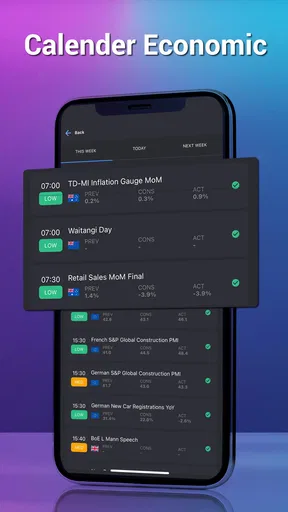
My first habit would be to record the exact time I see an idea, the currency pair involved, and the reason I am considering it. Signals can become less useful as market conditions change, so treating a notification or displayed suggestion as permanently valid is a mistake. I would then compare the idea with the current chart in my broker app, check whether an important economic announcement is approaching, and calculate the possible loss before thinking about a possible gain.
Worth Reading Before You Choose

EA SPORTS FC Mobile 26 Is a Bigger Football Game, but It Takes Time

Flipboard Shows What News Apps Must Do Beyond the Feed

Switching to Android Auto Means Rethinking Your Driving Routine

Google Calendar Makes a Crowded Week Easier to Manage

Ludo King Makes the Most of the Minutes Between Plans

Baby Panda World Brings Quick Play to Modern Phones, but Its Game Library Feels Busy
A simple journal makes the app more useful. I would mark whether I followed the signal, ignored it, or found that my own analysis disagreed. After several weeks, that record tells me more than a handful of successful trades. It can reveal whether I am using the tool consistently, chasing movement after it has already happened, or accepting suggestions without understanding them. The strongest feature of a signal app is often the discipline it encourages around a decision, not the signal itself.
There is a less obvious benefit to this approach: it separates the quality of the idea from the quality of the execution. If a trade loses because the market moved unexpectedly, that is different from entering late, using excessive leverage, or misunderstanding the pair. MyFxHelper can be part of the observation stage, but I would not let it blur those separate responsibilities.
Trust begins with visible choices
Because this is a finance app, I pay closer attention to trust than I would with a casual utility. I want to know what I am being asked to do, what information is visible on screen, and whether I can make choices without being pushed into a rushed action. The app’s public profile identifies MHFCORP as the developer, gives it a clear finance category, and lists a free download. Those details make the product easy to identify, but they are not by themselves proof that any trading idea is reliable.
I would also separate the app from the broker holding my money. A helper application should not be confused with custody, execution, or financial advice simply because both appear on the same phone. Before connecting anything, I would read each screen carefully and avoid entering broker credentials into a service unless I fully understand why they are needed and who controls the account. If I only need market guidance, I would prefer the least-access route available rather than granting broader access for convenience.
This is where user control matters more than attractive wording. I would look for clear settings, understandable prompts, and an obvious way to stop using optional functions. I would also review notification choices so that the app does not become a source of pressure during volatile periods. A signal arriving at an inconvenient moment can encourage impulsive action, especially when a trader is already watching a losing position.
Account boundaries and paid choices
MyFxHelper is free to install, but it includes in-app purchases ranging from about seven dollars to around three hundred thirty-five dollars per item. That range is important for budgeting. I would not assume that paying unlocks better outcomes, more accurate signals, or a safer trading process. Before selecting any paid option, I would identify exactly what changes, whether the purchase is recurring or one-time, and whether the benefit matches the way I actually use the app.
I would also keep payment decisions separate from trading decisions. A losing week can make a premium purchase feel tempting because it promises a solution, while a winning week can create overconfidence. Neither emotional state is a good basis for spending. My preference would be to use the free experience long enough to understand the app’s place in my routine, then decide whether a paid element saves meaningful time without changing my risk rules.
For families or shared devices, the Everyone content rating is reassuring in terms of broad accessibility, but it does not mean the financial subject is suitable for every user without supervision. A young or inexperienced person can still misunderstand leverage and loss even when an app is easy to open. I would keep purchase authentication enabled on the device and make sure another user cannot accidentally access a trading-related account or approve a purchase.
Data-sensitive moments deserve extra care
My most cautious moments would be installation, sign-in, payment, and any request to connect an outside account. Those are the points where I would slow down and read the wording rather than tapping through automatically. I would avoid sharing more personal information than the app’s function requires, and I would not upload identity documents or financial details simply because a screen makes the request look routine.
I would also inspect the operating system’s permission controls before and after setup. If a permission appears unrelated to checking forex information, I would question whether it is necessary and decline it when possible. The practical advantage of checking at the system level is that I can review and change access later instead of relying only on an initial prompt. That gives me a clearer sense of control over the phone.
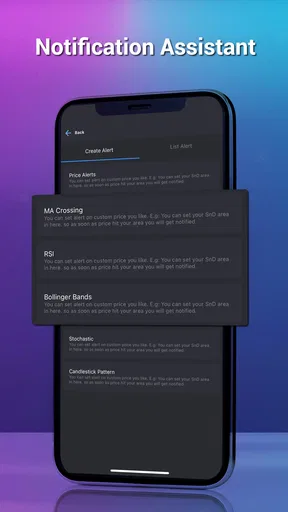
Notifications deserve their own review. A signal alert can be useful when I deliberately choose to monitor the market, but it can become distracting or emotionally persuasive when it arrives all day. I would disable categories I do not need, silence alerts during work or sleep, and avoid treating an urgent-looking notification as a command. This small adjustment helps preserve the difference between receiving information and being nudged into a trade.
On a shared or older device, I would be especially careful about screen previews and saved credentials. A lock-screen notification may reveal more about my activity than I intend, while an unlocked phone can expose sensitive financial context. I would use the phone’s own security tools, avoid leaving accounts open unnecessarily, and sign out when the device is not under my control.
Where it is genuinely useful in daily life
Imagine I have a short lunch break and want to review the market without opening a position. I could check MyFxHelper for a potential area of interest, write down the pair and the displayed direction, and then wait until I have time to verify the chart and relevant news. If the idea still fits my plan later, I can assess it through the broker’s risk controls. If it does not, the correct action is simply to discard it.
That scenario shows the app’s practical strength: it can help me organize attention when I do not want to scan every currency pair from scratch. It is also a good setting for testing whether the app improves my process without putting money at risk. I would use a watchlist or journal outside the app if necessary, because the most important record is the reasoning behind a decision, not merely the direction suggested.
Another useful case is comparing an app signal with a personal rule. For example, I might only consider trades that agree with a longer-term trend and have a predefined stop level. If MyFxHelper points toward a setup that fails either condition, I have learned something about my filter rather than lost money by following automatically. This turns the app into a prompt for analysis instead of an authority.
How it compares with familiar alternatives
Compared with a broker’s own application, MyFxHelper appears more focused on the helper or signal side of the experience. A broker app is usually the natural place to manage an account, review available margin, and place or close orders. I would not replace those controls with a signal app. The broker remains the better choice for execution because that is where the financial consequences are displayed directly.
Compared with a charting platform, MyFxHelper is likely to appeal to someone who wants a quicker directional reference rather than a workspace filled with indicators and drawing tools. That simplicity can reduce friction, but it can also reduce context. If I need to study support and resistance, compare several time frames, or inspect market structure closely, a dedicated charting tool is the stronger option.
Compared with manually following analysts or public trading communities, an app can feel more organized and less noisy. Yet organization should not be confused with verification. I would still ask how an idea fits my risk tolerance and whether I can understand the reasoning well enough to accept a loss. If I prefer detailed explanations, source transparency, and long-form market education, a research-focused service may be a better companion.
Practical friction I would not ignore
The biggest limitation is the temptation to compress a complicated decision into a simple signal. Forex markets do not become predictable because information is displayed neatly. Users who are new to trading may read confidence into a directional suggestion and underestimate the effect of leverage or transaction costs. I would skip this app as a primary tool if I were unwilling to learn basic risk management first.
There is also a workflow cost when information is split between services. If I view an idea in MyFxHelper, verify it on a chart, check news elsewhere, and execute through a broker, I must keep the timing and details aligned. That extra step is manageable, but it means the app is not necessarily the fastest choice for someone who wants one integrated workspace. A slower, more deliberate process is safer than a rushed one, but it still needs to fit the user’s habits.
The version listed for the app is 19.0.1, and the minimum operating system is Android 7.0. I would check compatibility before installing on an older phone, then keep the application and the operating system maintained where possible. On any finance-related app, I would also avoid modified installation files and use the official store route, because convenience is not worth weakening device security.
Who should use it, and who should pass
I can recommend MyFxHelper to a cautious trader who wants a mobile signal reference, understands that suggestions are not guarantees, and is willing to verify every idea independently. It may also suit someone building a trading journal and looking for a consistent prompt to begin research. The free entry point makes it easier to test whether the workflow is useful before considering any paid item.
I would recommend passing on it if the goal is guaranteed income, automatic success, or hands-off trading. It is also not the right fit for someone who needs advanced chart analysis, direct broker management, or extensive educational explanations in one place. In those cases, a broker platform, a professional charting application, or a structured learning resource would serve the need more directly.
Most importantly, I would not use any signal service with money I cannot afford to lose. I would begin with observation, paper notes, and very clear personal limits. Only after I understood how the app fits with my broker, my research, and my risk controls would I consider using its ideas in a live account.
My cautious verdict
MyFxHelper has a sensible role as a focused forex companion, especially for users who want a quick starting point before doing their own checking. Its 4.2 average and audience of over one hundred thousand installs show that it has found interest among mobile users, but popularity does not remove the need for independent judgment. I like the possibility of using it to structure attention, compare an idea with a plan, and maintain a record of decisions.
I would keep my recommendation deliberately narrow. Use MyFxHelper to begin a review of the market, never to end one. Check permissions and account boundaries, control notifications, think carefully about paid choices, and keep execution inside a platform that clearly shows the financial consequences. With those habits, the app can be a convenient part of a cautious workflow. Without them, its simplicity may encourage exactly the kind of rushed confidence that forex trading punishes.
For me, that makes it worth trying as a free helper rather than treating it as a complete trading solution. I would install it only with a specific purpose, test whether it improves my routine, and remove it from that routine if the signals create more pressure than clarity. That balanced approach is the fairest way to judge MyFxHelper - Forex Signal and the safest way to decide whether it belongs on my phone.
Pros
- Clear forex signals with entry
- stop-loss
- and take-profit levels.
- Useful market updates for traders who want quick daily insights.
- Simple interface makes signals easy to find and review.
- Can help beginners understand trade setups and risk parameters.
- Convenient access to forex information from a mobile device.
Cons
- Signals are not guaranteed and may lead to financial losses.
- Some features or signals may require a paid subscription.
- Limited value for traders seeking advanced charting tools.
- Signal timing can be affected by market volatility or delays.
- Users still need independent research before placing trades.
FAQs for MyFxHelper - Forex Signal
What is MyFxHelper - Forex Signal, and how does it work?
MyFxHelper - Forex Signal is designed to provide currency-trading ideas, market updates, and possible entry and exit levels for selected forex pairs. After opening the app, users can review available signals and supporting details before deciding whether a trade is appropriate. It should be treated as an analysis and alert tool, not as an automatic guarantee of profitable results.
Are the forex signals from MyFxHelper suitable for beginners?
The app may be useful for beginners who want to follow market ideas in a more structured way, but it should not replace basic forex education. New traders need to understand currency pairs, spreads, leverage, stop-loss orders, and risk management before acting on a signal. It is safer to study each recommendation and practice with a demo account first.
Does MyFxHelper guarantee profitable trades or accurate signals?
No forex signal application can guarantee profits, and MyFxHelper should not be considered an exception. Currency markets can change quickly because of economic announcements, political events, liquidity conditions, and unexpected volatility. Signals may become outdated or reach their targets differently from expectations, so users should verify the information, manage risk carefully, and only trade money they can afford to lose.
Is MyFxHelper - Forex Signal free to download and use?
The availability of free features, premium signals, subscriptions, or in-app purchases can depend on the version of the app and the platform where it is downloaded. Before installing, users should check the current store listing for pricing, trial conditions, renewal terms, and included features. Reviewing these details is especially important if access to advanced alerts or additional analysis requires payment.
What should I check before following a signal in MyFxHelper?
Before placing any trade, review the currency pair, suggested entry range, stop-loss level, take-profit targets, signal age, and the market conditions surrounding the recommendation. Also consider your account size, broker spreads, leverage, and personal risk limit. A signal is only one piece of information; users should confirm it independently and avoid entering trades simply because an alert appears in the app.


